Ads 230 x 230

Friday, September 23, 2011

Amazing plugins for social networks

Posted by: , 0 comments

Add Animated Flying Twitter

Apply the code ay html/JavaScript plugin

-------------------------------------------------------------------
The Code

 <!-- Twitter Bird Widget for Blogger by Way2blogging.org --> <script type="text/javascript" src="http://bloggerblogwidgets.googlecode.com/files/way2blogging.org-tripleflap.js"> </script> <script type="text/javascript"> var twitterAccount = "إسمك على تويتر"; var tweetThisText = " <data:blog.pageTitle/> ~ <data:blog.Url/> "; tripleflapInit(); </script> <span style="font-size:11px;position:absolute;"><a title='blogger widget by way2blogging.org' href="http://www.way2blogging.org" target='_blank'><img border='0' src='http://img1.blogblog.com/img/blank.gif'/></a></span><a href="http://www.spiceupyourblog.com" target="_blank"></a> <!-- Twitter Bird Widget for Blogger by manba3.co.cc -->
---------------------------------------------------------------------

Add Facebook like box With hover effect

  1. Go to Blogger Dashboard < Design tab > Edit Html
     
  2. Search for tag 
  3. Add below line of code Before tag
Step 2: Adding Widget Code it's Simple Replace my facebook page URL below with the URL for your page. (Note:- Facebook URL Must starting with "http://" and it contains no space or illegal Characters )


 Live Demo معاينة الاضافة :-
Watch the live demo at Right of this Page

Here There are 2 Simple Steps

 
Note: Adding Jquery JavaScript Plugin(Ignore this step if your blog have already a Jquery Plugin)
<script src="https://ajax.googleapis.com/ajax/libs/jquery/1.6.1/jquery.min.js" type="text/javascript"></script>
ثم توجه الى تصميم/اضافة اداة/html/java ثم اضف الكود التالي

<script type="text/javascript">
//<!--
$(document).ready(function() {$(".w2bslikebox").hover(function() {$(this).stop().animate({right: "0"}, "medium");}, function() {$(this).stop().animate({right: "-250"}, "medium");}, 500);});
//-->
</script>
<style type="text/css">
.w2bslikebox{background: url("https://blogger.googleusercontent.com/img/b/R29vZ2xl/AVvXsEiu6pKiTL2mZy0nI3Tl16RUuIqlTj1DtZ_JMceE72xdlKdbDW_AA-RG_v4k4dSLP1fTxN4oPmKn9xQgaXuqi670K_LfAXOdifaaeMkS_6D9CSzUboM3t0vcCgVulayYwBIZXuVnsOZP5J1a/s150/w2b_facebookbadge.pn") no-repeat scroll left center transparent !important;display: block;float: right;height: 270px;padding: 0 5px 0 46px;width: 245px;z-index: 99999;position:fixed;right:-250px;top:20%;}
.w2bslikebox div{border:none;position:relative;display:block;}
.w2bslikebox span{bottom: 12px;font: 8px "lucida grande",tahoma,verdana,arial,sans-serif;position: absolute;right: 6px;text-align: right;z-index: 99999;}
.w2bslikebox span a{color: #808080;text-decoration:none;}
.w2bslikebox span a:hover{text-decoration:underline;}
</style><div class="w2bslikebox" style=""><div><iframe src="http://www.facebook.com/plugins/likebox.php?href=https://www.facebook.com/pages/Over-the-World/255991854431966&amp;width=245&amp;colorscheme=light&amp;show_faces=true&amp;connections=9&amp;stream=false&amp;header=false&amp;height=270" scrolling="no" frameborder="0" scrolling="no" style="border: medium none; overflow: hidden; height: 270px; width: 245px;background:#fff;"></iframe><span>By <a href="http://www.way2blogging.org/">Way2blogging</a> / <a href="http://www.way2blogging.org/2011/06/add-static-facebook-pop-out-like-box.html">+Get This!</a></span></div></div>


finally replace my page link with yours


-------------------------------------------------------------------------

Animated Sliding Panel with content

Live Demo :-
Click here! to See Live Demo
Watch the live demo at top left of this Page

there are three steps

Step 1: Adding Jquery JavaScript Plugin(Ignore this step if your blog have already a Jquery Plugin)


<script src="http://ajax.googleapis.com/ajax/libs/jquery/1.6.1/jquery.min.js"
 type="text/javascript">script>

Step 2:


<script src="http://bloggerblogwidgets.googlecode.com/files/jquery.slidePanel.min.js"
 type="text/javascript">script>

Step 3: Adding Jquery Slide Panel Widget Code
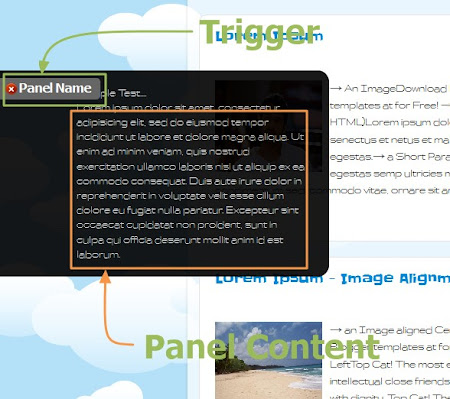
Here i am Giving Widget Code generator Form and i Include all possible Options with advanced CSS Styling. You can add multiple pannels.

Customize the Trigger CSS & Panel Content CSS Fields as you need.
For Color Code please use our HTML Color Code Generator Tool.

Settings :
"Put any Unique Number" means, if you add multiple Sliding panels the each slide panels have special CSS and Jquery Callings. so you put any Unique number, for Ex:- 3, 7, 6, 8, 12, 26, 56 ...
for Trigger Name and Panel Content please See the Image Below.


------------------------------------------------------------------------------
Auto Scrolling Recent posts

Auto Scrolling Recent Posts Widget, Blogger recent posts in your blog which looks Good in your Blogger blog. This is similar to display recent posts in your side bar or any where you want, but this will have marquee effect in this widget. You can scroll recent posts horizontally or vertically according to your need.


How to Install This Widget On 'Blogger' ?
  1. Customize Options in Given Widget Generator Form
  2. Click on Generate Button
  3. Click Preview** Button to see your widget Preview
  4. Finally Click Add to Blogger Button to add this widget on Your blog
**Note:- After changing any values, First Click Generate Button and then See Your Preview
 Note:- Choose appropriate Image Bullet or Icon That have transparent Background and small in Size 


=========+++=======


Sunday, September 4, 2011

Cursor Editing for custom view in Blogger

Posted by: , 0 comments

Setup Steps

  1. Log in and go to your account dashboard.
  2. Click on "Template"
  3. Next click on "Edit HTML"
  4. Next paste the below code at the Text Box
  5. Save Your template

How to change Blogger Cursor

1) Go to Blogger Layout > HTML
2)and Look for this code:
3)Copy the code below, and paste the cursor code below the tag
5) Save your template and you’re pretty much done.
If you want to change your animated cursor, you can pick one here http://www.cursors-4u.com/ and simply replace the highlighted url in green to your selected cursor.
That’s it and Merry Christmas!

note : extract the curor link from the html code in condition to be [ *.cur ] not [*.ani ]


BEST:
http://cur.cursors-4u.net/cursors/cur-4/cur394.cur
http://cur.cursors-4u.net/games/gam-14/gam1305.cur
http://cur.cursors-4u.net/symbols/sym-6/sym597.cur
http://cur.cursors-4u.net/games/gam-3/gam257.cur
http://cur.cursors-4u.net/cursors/cur-2/cur118.cur


The code for this tweak is javascript. All you need to do is to add the javascript code to your template but only within the head () tag.

The Head Tag


The head tag begins with this tag: and ends with this tag: . Go to Layout->Edit HTML.


Locate for end head tag () and paste your javascript code above it, then save.


The Code:


<script type="text/javascript">

// <![CDATA[

var colour="#666666";

var sparkles=40;


var x=ox=400;

var y=oy=300;

var swide=800;

var shigh=600;

var sleft=sdown=0;

var tiny=new Array();

var star=new Array();

var starv=new Array();

var starx=new Array();

var stary=new Array();

var tinyx=new Array();

var tinyy=new Array();

var tinyv=new Array();

window.onload=function() { if (document.getElementById) {

var i, rats, rlef, rdow;

for (var i=0; i<sparkles; i++) {

var rats=createDiv(3, 3);

rats.style.visibility="hidden";

document.body.appendChild(tiny[i]=rats);

starv[i]=0;

tinyv[i]=0;

var rats=createDiv(5, 5);

rats.style.backgroundColor="transparent";

rats.style.visibility="hidden";

var rlef=createDiv(1, 5);

var rdow=createDiv(5, 1);

rats.appendChild(rlef);

rats.appendChild(rdow);

rlef.style.top="2px";

rlef.style.left="0px";

rdow.style.top="0px";

rdow.style.left="2px";

document.body.appendChild(star[i]=rats);

}

set_width();

sparkle();

}}

function sparkle() {

var c;

if (x!=ox || y!=oy) {

ox=x;

oy=y;

for (c=0; c<sparkles; c++) if (!starv[c]) {

star[c].style.left=(starx[c]=x)+"px";

star[c].style.top=(stary[c]=y)+"px";

star[c].style.clip="rect(0px, 5px, 5px, 0px)";

star[c].style.visibility="visible";

starv[c]=50;

break;

}

}

for (c=0; c<sparkles; c++) {

if (starv[c]) update_star(c);

if (tinyv[c]) update_tiny(c);

}

setTimeout("sparkle()", 40);

}

function update_star(i) {

if (--starv[i]==25) star[i].style.clip="rect(1px, 4px, 4px, 1px)";

if (starv[i]) {

stary[i]+=1+Math.random()*3;

if (stary[i]<shigh+sdown) {

star[i].style.top=stary[i]+"px";

starx[i]+=(i%5-2)/5;

star[i].style.left=starx[i]+"px";

}

else {

star[i].style.visibility="hidden";

starv[i]=0;

return;

}

}

else {

tinyv[i]=50;

tiny[i].style.top=(tinyy[i]=stary[i])+"px";

tiny[i].style.left=(tinyx[i]=starx[i])+"px";

tiny[i].style.width="2px";

tiny[i].style.height="2px";

star[i].style.visibility="hidden";

tiny[i].style.visibility="visible"

}

}

function update_tiny(i) {

if (--tinyv[i]==25) {

tiny[i].style.width="1px";

tiny[i].style.height="1px";

}

if (tinyv[i]) {

tinyy[i]+=1+Math.random()*3;

if (tinyy[i]<shigh+sdown) {

tiny[i].style.top=tinyy[i]+"px";

tinyx[i]+=(i%5-2)/5;

tiny[i].style.left=tinyx[i]+"px";

}

else {

tiny[i].style.visibility="hidden";

tinyv[i]=0;

return;

}

}

else tiny[i].style.visibility="hidden";

}

document.onmousemove=mouse;

function mouse(e) {

set_scroll();

y=(e)?e.pageY:event.y+sdown;

x=(e)?e.pageX:event.x+sleft;

}

function set_scroll() {

if (typeof(self.pageYOffset)=="number") {

sdown=self.pageYOffset;

sleft=self.pageXOffset;

}

else if (document.body.scrollTop || document.body.scrollLeft) {

sdown=document.body.scrollTop;

sleft=document.body.scrollLeft;

}

else if (document.documentElement && (document.documentElement.scrollTop || document.documentElement.scrollLeft)) {

sleft=document.documentElement.scrollLeft;

sdown=document.documentElement.scrollTop;

}

else {

sdown=0;

sleft=0;

}

}

window.onresize=set_width;

function set_width() {

if (typeof(self.innerWidth)=="number") {

swide=self.innerWidth;

shigh=self.innerHeight;

}

else if (document.documentElement && document.documentElement.clientWidth) {

swide=document.documentElement.clientWidth;

shigh=document.documentElement.clientHeight;

}

else if (document.body.clientWidth) {

swide=document.body.clientWidth;

shigh=document.body.clientHeight;

}

}

function createDiv(height, width) {

var div=document.createElement("div");

div.style.position="absolute";

div.style.height=height+"px";

div.style.width=width+"px";

div.style.overflow="hidden";

div.style.backgroundColor=colour;

return (div);

}

// ]]>


</script>


xxxxxx

Add floating hover text which trails

If you want to show any text like "Welcome Here" or "Sign My Guestbook", which follows the mouse cursor (trail text effect), like the one displayed in the image,.

Then, simply add the code in any HTML/JavaScript widget (Log in -> Layout -> Add a Gadget).


The Code:


9-pointer strategy to surpass other Bloggers in your niche

Posted by: , 0 comments

Post image for 9-pointer strategy to surpass other Bloggers in your niche
Ever wondered why particular bloggers become famous in less time and why particular blogs get dramatically more traffic in small span of time??? Then, you are at right place. Most of such bloggers have a well planned Blogging strategy which makes them achieve their goals faster than others. They have a good mix of SEO, reader interaction and reputation for their blogs which enables them to surpass other bloggers in their niche.
I kept a close look at the activities of such bloggers and now, presenting you the 9-pointer strategy to surpass other bloggers in your niche.

9 pointer Strategy :

Work on the 9-pointer strategy below and I am sure you can easily bypass other Bloggers in your niche.
1. Unique content and Creativity:
This is going to occupy position in every list of blogging tips. We have no alternative to Unique content. Try your best to include at least 2-3 unique points in your content. Stop repeating the same points which are found on other blogs in your niche. Use your creativity. Everytime, before hitting the “Publish” button, ask yourself “Why will visitor read my article and not other’s article???”. If you’ve got the answer to this question, it’s the time to hit on “Publish”.
2. Close look at their topics and Better Articles:
Note the topics which are popular on other blogs in your niche. Research on that topic using Google and develop an article which is far better than the article on the niche blog. Post it on your blog and also, if possible, linkback to this article from the niche blog. You can use Commenting and Guest Posting for linking back.
3. SEO a.k.a Search Engine Optimization:
You want to get more traffic than other bloggers in your niche. Right??? Then work on SEO to get good amount of organic traffic from search engines. Organic traffic can work wonders in building your blog readership. Research on the keywords for which the other bloggers are getting decent traffic from Google. Start working on SEO for the same keywords. This will take time, but the end result will declare you as the winner.
4. Backlinks:
You want to rank higher than your buddy bloggers in Google search. Backlinks play a major role in SERP. So, use BacklinkWatch to check for all possible backlinks to their blogs. Put an effort to get the same backlinks to your blog. Plus, you have to get backlinks from other blogs too. This will increase your backlinks count taking your result ahead of your buddy bloggers in Google search.
5. Use social networks:
Connect with your buddy bloggers on social networks. Social network is a great place to develop relationships and to foster your business. Try to be helpful to other bloggers in your niche. Yes, they are your competitors, but make sure the competition is healthy!!! Also, take time to connect with your readers on Facebook and Twitter. This will help in bridging the “stranger-gap” between you and your readers, helping in building loyal readership for your blog.
6. Guest post/comment on niche:
You want to drive traffic from top blogs in your niche. So, the best way is to start Guest Posting on such blogs. Make sure you add an attractive “Author-Bio” section with a link to your blog. But, it is not possible to Guest Post everywhere. At such times, commenting does the trick. Try your best to add valuable points to the discussion and also find your place in Top Commentators widget. You can refer my article on How to post an efficient comment.
7. Prove them wrong:
Take a close look at each post of bloggers in your niche with a view to find errors in their opinions. Once you get such error, post an article on your blog on the same topic and correct the mistake done by your niche blogger. This will no doubt, proclaim your superiority over the buddy blogger. But, make sure that you handle this point in a friendly manner as you are more probable of harming relations with such bloggers.
8. Presentation and Personal lingo:
Another important trick is to develop your own style of writing articles and using the same style throughout your blog. This will make readers addicted to your posts and they will return to your blog, even if they find the same information elsewhere on web. So, in short, article presentation format does the trick over here. Also, developing your own personal lingo highlights your articles from the rest.
9. Develop your Blogger reputation:
Develop yourself as a Brand in your niche. We know several great bloggers like Darren Rowse known as ProBlogger and Brian Clark known as CopyBlogger who have demonstrated the importance of this point. I know this is not done within a fortnight. But, nothing comes an easy way in Blogging. Refer my article on How to develop your Blogger Reputation to get yourself a reputation as a successful blogger.
So friends, this was the 9-Pointer strategy which can help you in building your loyal readership and surpassing other bloggers in your niche.
Got any other tip which is useful to surpass other blogggers??? Please share it with us in comments.


Saturday, September 3, 2011

Best free productivity tools web pro

Posted by: , 0 comments

As a web designer or web developer, focusing on your core work responsibility — producing websites — is tough enough of a job. So, I want to share with you a list of free tools to help you in various aspects of your work so that you can spend more time designing and less time on the other necessary things you need to deal with as a web professional.

1. Bounce

Bounce
Bounce is both a fun and useful way to optimize and analyze websites. The tool allows you to share web page screenshots. The web app takes a screenshot of the web page after you enter its URL. You can then click and drag on the screenshot to make notes.
I found that by sharing screen grabs and notes through Bounce, I’m able to get helpful feedback on my designs. The built-in sharing functionality lets you seamlessly post your shots on Twitter and Facebook.

2. MindMeister

MindMeister
Brainstorming new ideas for projects could be limited by the capabilities of the tool you use. With MindMeister, an excellent mind-mapping tool, you have great options for composing and drawing out your thoughts, supporting your creative habits through its intuitive interface.
I particularly enjoy the collaboration feature that allows team members to easily contribute and help shape brainstorming sessions.

3. Simplenote

Simplenote
Stop littering your computer monitor with Post-it notes. Simplenote is an app that’s straightforward and simple, allowing you to jot down your thoughts and ideas and share them from any internet-enabled device. Because it’s an open platform, Simplenote boasts an incredible amount of other tools that support Simplenote syncing, which makes working with it even more useful.

4. Woorank

Woorank
How well is your site doing? Woorank helps you answer that question. It’s a super handy tool, giving you a comprehensive score of any website you want to learn about. But there’s much more to the simple score. Get insights into Alexa ranking, an SEO analysis and a list of competitor sites, as well as loading times and usability scores.
With just one click, you can get the full reports of competitor sites and see how you can improve. It can also help you perform design research on competing sites as well as learn about traffic trends in the niche.

5. ResizeMyBrowser

ResizeMyBrowser
It can often be a big hassle to know how your web design is viewed on various monitors and browsers. ResizeMyBrowser provides you with common preset dimensions for popular default browser sizes, such as 1440×900 (MacBook Pro, 15”) and 480x800px (Google Nexus One smartphone).

6. Ge.tt

Ge.tt
This is one of the simplest ways to share files online that I’ve found. You arrive at the site, upload your files, and whilst the files are uploading, you can already share the link. Additionally, you get interesting stats about your files such as the number of people that’s seen your shared files.
From sharing files with your clients to presenting mock-ups in your social network, this file-sharing tool can help increase your productivity.

7. Coolendar

Coolendar
Coolendar is a very efficient way to create to-do lists. It automatically syncs with your favorite calendars (e.g. Google Calender, iCal and Outlook). The stunning part is the hassle-free syntax you can use. No more time setting and fiddling with scheduling. Write one line such as "tomorrow 5pm wireframe for Mrs. Client’s site due" and it automatically sets the task for you.
Integrate it with Google Talk and get a reminder for a new item on your to-do list via a chat message. Brilliant.

8. Smartr

Smartr
Smartr is an incredibly handy iPhone app that pulls in tweets and status updates of your followers and friends and then turns them into a newsfeed with little thumbnail previews. The algorithm of the app gives you only the most useful content. Some tweeting and social-sharing capabilities are present so you can easily retweet, mark as a favorite or save to read for later.

9. Buffer

Buffer
(Full disclosure: I’m the co-founder of Buffer.) Buffer is a tool that allows you to throw tweets into your Buffer from any web page. These tweets will then be posted for you, well spaced out over the day. It streamlines your tweets so you can better focus on your work.

10. FontStruct

FontStruct
FontStruct is a simple way for you to design your own custom fonts. The tool offers you a great array of different geometrical shapes you can use to create your fonts. After designing your font, you can generate high quality TrueType fonts that you can use with any Mac or Windows application, such as Photoshop.

====+++===


Friday, September 2, 2011

What Are Websites Made Of ....

Posted by: , 0 comments


The Internet is such an integral part of our lives nowadays, yet how much do we know about what’s occurring under the hood?
From the proliferation of web programming languages such as PHP, to the matter of data expansion, storage size, rate of growth of the Internet, and the amount of bandwidth required to serve the world’s Internet users, this infographic looks at what websites are made of.

Infographic
What Are Websites Made Of? (Infographic)


Slideshow

 
صفحات مبعــثرة كسرت حاجز الصمـت لتحكي
متعة الحياة أن تعمل عملا لم يسبقك إليه أحد ولم يتوقعه الآخرون.................. Its just another way to unlock ur potential representing my internists with other. By sniffing the web u might see several info.,instructions and details. here i collect similar and simplify them to u, cutting out from my time, efforts even i create my unique posts