Sunday, June 19, 2011







Wednesday, June 1, 2011
MD5 Hashing Algorithm
Posted by: , 0 commentsMD5 [Message Digest Algorithm 5]
الـ MD5 هي علاقة رياضية Hash algorithm لتوليد رقم بحيث يكون عبارة عن توقيع لهذه البيانات أي أنه ليس تشكيل آخر البيانات و ليس تشفيراً للبيانات أي عندما نستخدم دالة الـ MD5 على String فإننا لا نشفر الـ String بل نأخذ توقيعاً إلكترونياً له والأمر شبيه بالـ CRC و لهذا السبب فالناتج هو رقم له طول ثابت 128 بت و هذا الرقم يتم إظهاره بهيئة الـ HEX فيصبح طول بيانات الخرج 32 محرف لأن الرقم الأصلي يشغل حجم 16 بايت .
MD5 check Used Is MD5 Checksum
MD5 تم تصميمها عام 1991 بعد الهاش MD4
مبتكر هذا النظام (MD5) شركة RSA Data Security .
SHA-256 [Secure Hash Algorithm]
ما تم تطويره مؤخرا SHA-256 وهي خوارزمية رياضية مشفرة بطول 256بت..وهناك أخرى متطورة مثل SHA-512 و SHA-384
في العام 2010 تم الاعتماد على الهاشSHA-2 وعائلته وذلك لتقارير أمنية تفيد أنه تم كسر حماية ال MD5 وأصبح بالإمكان إنتاج برنامجين بنفس MD5
وقد أصدر قسم الأمن القومي الأمريكي بيانا يقول فيه أن الهاش MD5 تم كسره ولم يعد آمنا..
طيب مازال هذا عبارة عن توقيع فهل من الممكن أن نحصل على البيانات من الـ MD5؟
أحياناً لكن نظام الـ MD5 بالأصل قد تم إنشاؤه فقط لإضافة توقيع إلكتروني للملفات الكبيرة أو للملفات المشفرة و عندما كان نظام الـ MD4 كانت معادلته بسيطة و بالتالي عمله أسرع و بالتالي تكبر إمكانية تعرضه لـ Force Attack فابتكرو نظام الـ MD5 لجعله أبطأ نوعاً ما و أأمن من سابقه.
MD2 was optimized for 8-bit machines
كيف تتم عملية الحصول على البيانات من الـ MD5؟
بعملية الـ Brute Force Attack أي بالتجريب و مطابقة النتائج يعني بيبدأ بيحسب الأحتمالات و الأمكانات و بيجرب يطلع قيمة الـ MD5 له فإن تطابقت مع المطلوب فهي الباسوورد فمثلاً بيبدأ ياخذ الـ MD5 للـ a ثم للـ b و هكذا... لكن من الممكن وجود عدد من الباسووردات لها نفس الـ MD5 و شي ثاني إذا كانت الباسوورد طويلة كفاية فستتطلب وقت كبير جداً لحلها.
ما الطريقة لحماية الباسوورد من أن تكون مكشوفة للعيان؟
بكل بساطة اعمل: Md5(MD5($Password);X أو عمل MD5 للبيانات بعد أخذ الـ CRC لها مثل md5(crc32($Password));X و بهذا إن كانت الباسوورد طولها محرف واحد فبأخذ الـ MD5 الأول لها ستعطي ناتج ذو 32 حرفاً و هذا الأخير نعمل له MD5 بهذا سيكون من المستحيل تماماً الوصول للباسوورد إذاً فالغاية من عمل ذلك مرتين هو لحماية الباسووردات القصيرة من الاختراق و لتأمين حماية مضاعفة.
(الـ X لتلافي قلب النص في الـ Right-to-left)
هل يمكن استعادة كلمة بالعربي من الـ MD5 ؟
نعم لكن البرنامج الذي يقوم بهذه العملية مازال غير موجود مع أنه من الممكن برمجته و بسهولة ولو كان ذو فائدة و استخدام لوجد من زمان.
حتى قرب الموضوع أكثر، كلنا بيشتغل على الـ Winzip! و كلنا لاحظ بأنه عندما يتغير أي بايت في الملف راح يحس البرنامج على هذا التغيير و يرسل رسالة خطأ بأن الملف تالف!
هل تعلم كيف يتم ذلك؟
يستخدم الـ Winzip مايسمى بالـ CRC ليتحقق من صحة البيانات إذ يوجد في الملف رقم تم حسابه من بيانات الملف و عند تشغيل البرنامج يقوم البرنامج بحساب الـ CRC و مقارنتها مع القيمة الموجودة في الملف .
أغلب البرامج تستخدمها و حتى ما نروح بعيد فبروتوكول الـ TCP يستخدمها في الـ HEADER للتحقق من سلامة البيانات و الهدر يسمى CRC check .
طيب ياترى ألا تجدوا بأنه من المنطقي وجود قيمتين تعطيان نفس قيمة الـ MD5 ؟
نعم و قد يكون هناك عدد كبير من التطابقات.
بسبب أن عدد احتمالات قيم الـ MD5 هو 2^128 صحيح أنها قيمة كبيرة جداً جداً جداً و لكن احتمالات البيانات بشكل عام لانهائي.
MD5 (6.2-RELEASE-i386-disc1.iso) = 3d27214700687c0b5390e8b6dd3706e3
6.2-RELEASE-i386-disc1.iso هو اسم الملف
3d27214700687c0b5390e8b6dd3706e3 هو المزيج أو الهاش Hash
وبالتالي فلو أنك قمت بتحميل الملف و وجدت أن الـ Hash هو مطابق لما هو موجود في الموقع فقد قمت بتحميل الملف على أكمل وجه Bit-by-Bit
هل md5 موجود على نظام التشغيل الذي أعمل عليه؟
الحمد لله md5 موجودة على معظم أنظمة التشغيل و منها على سبيل المثال لا الحصر
FreeBSD and all other *BSDs, Linux, Mac OS X, M$ Windows, Solaris, HP-UX, AIX and more
كيف أستخدم هذه الأداة؟
من خلال سطر الأوامر، نكتب الأمر md5 و من ثم اسم الملف، و هذا مثال من نظام جينتو لينكس
md5sum freebsd_security_features.mov
a84f4b7608eaad2a101ff48f6b342e07 freebsd_security_features.mov
GUI programs for MD5 Check
MD5 Checker
Code:
http://www.mediafire.com/?y2d3nlmrm1x
pass : pass : security-sh3ll

Monday, May 16, 2011
US NAVY Stealth Technology (Geometry and Water Curtain Technology)
Posted by: , 0 comments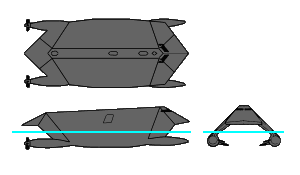





Saturday, May 14, 2011
Remove a Document Stuck in printer's queue
Posted by: , 0 commentsThe print queue is managed by the "Print Spooler" service. (The process of adding a document to the print queue, or sending it to the printer from the print queue is referred to as "spooling", which dates back to days when documents to be printed were written to a spool of magnetic tape and then physically taken to a different device to be printed.)
Here is the solution
Each printer you have available on your system has its own queue. You can view the print queue for each by opening up Control Panel, and going to Printers, or Devices and Printers, and double clicking on the print icon you'll find there. Here's the print queue for my printer :

You can see that the document is "Spooling". If there are multiple documents waiting to be printed they would all be listed.
You can also cancel printing a document if it shows up in the print queue: right click on the document and click on the Cancel option.
Now, it's important to note that Cancel doesn't always work, and that the document actually being printed might not be listed. That's because the spooler is just a stop along the way. Many printers actually have very large buffers of their own and might have already received several pages, if not the entire document, therefore removing it from the Windows print queue often well before the pages are actually printed.
But what about the opposite, which is really what this question is all about? What do you do when the printer should be printing, the print queue shows several documents ready to be printed, and yet ... nothing's happening?
First, check all the "usual" stuff. Is the printer out of paper? Is it complaining about some other kind of fault? (If you look closely at my print queue above the printer is complaining about "No Toner/Ink" since I opened the cover to pause printing.) Is the printer connected and powered on, even? Is there a paper jam?
You get the idea. There are a lot of things that can stop a printer from printing, and nine times out of ten it's one of those issues that gets in the way.
And yet, sometimes not.
An unfortunately common scenario looks like this:
-
Your printer is confirmed ready to print.
-
You have documents in the print queue.
-
Nothing is printing, even though it looks like it should.
-
Attempting to cancel a print job in the queue does nothing.
-
Rebooting doesn't help.
The solution is to clear the print queue manually. This is done on the computer to which the printer is connected.
-
Turn off your printer.
-
Right click Computer (in the Windows 7 Start Menu) or My Computer (on your desktop), and click Manage.
-
In the resulting dialog, expand Services and Applications, then click on Services. Scroll down the resulting list to find Print Spooler.
-
Right click on Print Spooler and click on Properties.

-
Click on Stop to stop the print spooler. (You can leave this dialog open.)
-
Now, use Windows Explorer to navigate to the folder c:\Windows\System32\spool\PRINTERS. A quick way to do this is to click on Start then Run and then enter "c:\Windows\System32\spool\PRINTERS" as the item to run.
-
Delete the contents of this folder.
-
Back at the Printer Spooler Properties dialog, click on Start.
-
Turn your printer back on.
-
Print something.
If your printing problem was related to a stuck printer queue, you should now be able to print again.
=========+++========


